

You integrate Bokimo AI into your applications through a REST API. It accepts HTTP requests with your API key, campaign data, and recipient lists, then returns delivery status and tracking IDs. Most developers can get a basic integration running in under two hours using the provided SDKs for Node.js, Python, PHP, and Ruby. The API handles the heavy lifting authentication, rate limiting, and webhook callbacks automatically.
This setup lets you send transactional emails, trigger marketing sequences, and track engagement without needing to build your own email infrastructure. Whether you're running an e-commerce store, a SaaS dashboard, or a mobile app backend, the endpoints fit into existing workflows. This guide covers authentication, code examples, webhook setup, and troubleshooting for production environments.
API Architecture Basics
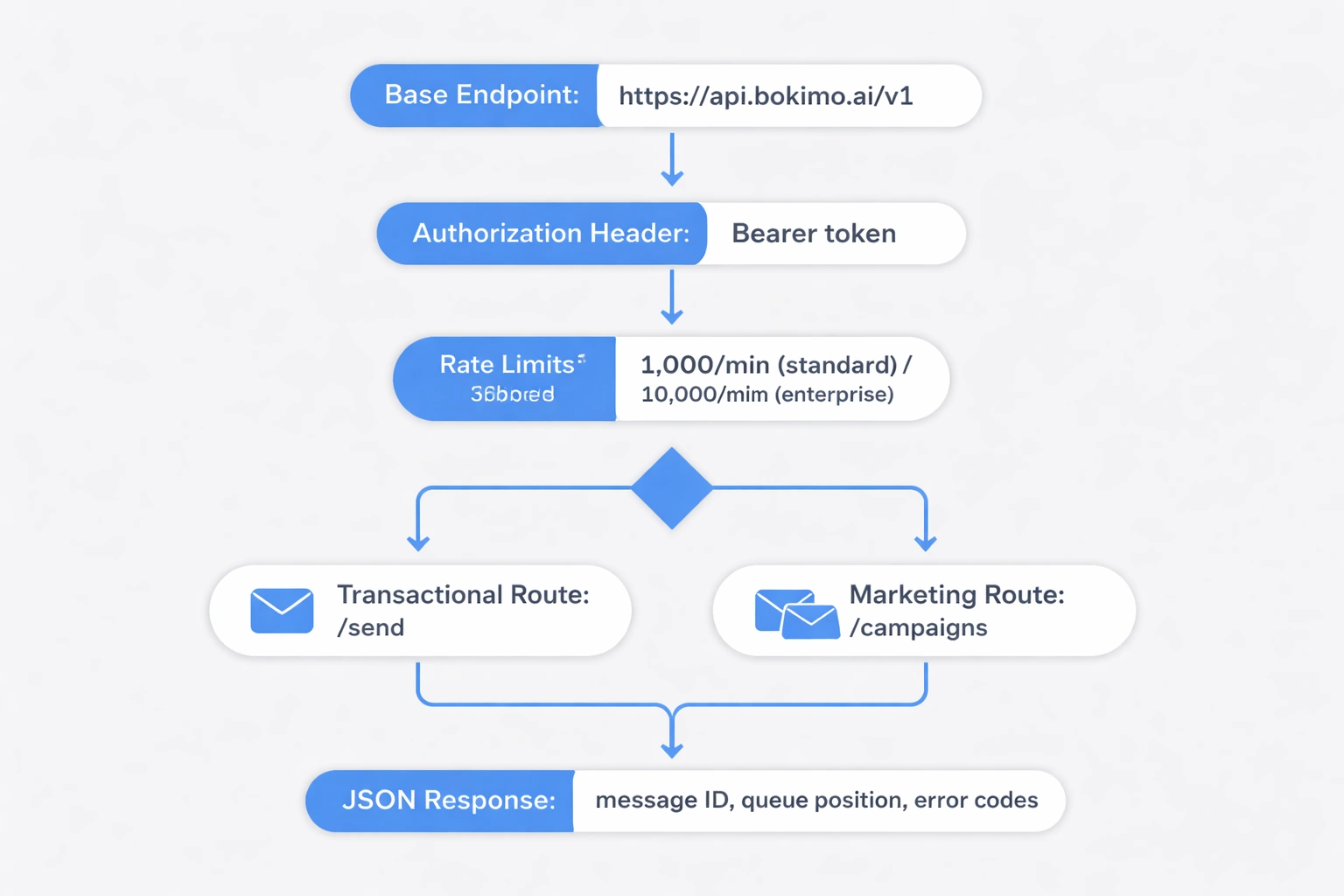
The base endpoint is https://api.bokimo.ai/v1, and it expects JSON payloads for everything. You pass your API key in the Authorization header using Bearer token format. Rate limits start at 1,000 requests per minute for standard plans and go up to 10,000 for enterprise accounts.
The API keeps transactional and marketing endpoints separate. Transactional routes (/send) handle one-off emails like password resets and receipts. Marketing routes (/campaigns) manage bulk sends and automated sequences. Both return JSON responses with message IDs, queue positions, and error codes.
Webhooks push real-time events opens, clicks, bounces, unsubscribes to your server. You configure the URLs in the dashboard under Settings > Integrations. Bokimo signs each webhook with HMAC-SHA256 to prevent spoofed payloads. Always verify signatures before processing events.
The SDK libraries wrap raw HTTP calls with language-native methods. The Node.js SDK uses async/await, the Python SDK follows PEP 8, the PHP SDK supports Laravel facades, and the Ruby SDK includes ActiveRecord mixins for Rails. All of them handle retries, pagination, and error parsing automatically.
Getting Your API Key and Authentication
Go to the Bokimo dashboard at https://bokimo.ai/email/auth/sign-in, then navigate to Settings > API Keys to generate credentials. Each key is a 64-character hexadecimal string prefixed with bk_live_ for production or bk_test_ for sandbox. Store these in environment variables never hardcode them into repositories.
Pass your key in the header of every request:
Authorization: Bearer bk_live_a3f8d9c2e1b4567890abcdef1234567890abcdef1234567890abcdef12345678
Test authentication with a GET request to /account:
curl https://api.bokimo.ai/v1/account \
  -H "Authorization: Bearer YOUR_API_KEY"
A successful response gives you account details: plan tier, usage limits, and remaining quota. A 401 status means invalid credentials. A 403 means the key is valid but lacks permissions for the resource.
Rotate keys quarterly or immediately if you suspect exposure. Deleting a key in the dashboard revokes access within 60 seconds across all infrastructure. Use separate keys for development, staging, and production to keep environments isolated.
Sending Your First Transactional Email
Use the /send endpoint for single emails triggered by user actions. Construct a POST request with sender details, recipient address, subject line, HTML body, and optional attachments. The API validates the format, queues the message, and usually delivers it within 3 seconds.
Here is a Node.js example using the official SDK:
const Bokimo = require('@bokimo/node');
const client = new Bokimo('YOUR_API_KEY');

const message = await client.send({
  from: {
    email: '[email protected]',
    name: 'Your Store'
  },
  to: [{ email: '[email protected]' }],
  subject: 'Order #12345 Confirmed',
  html: '<p>Thanks for your order!</p>',
  text: 'Thanks for your order!',
  tags: ['order-confirmation'],
  metadata: { orderId: '12345' }
});

console.log(message.id); // msg_7d8e9f0a1b2c3d4e
The tags array helps organize emails for reporting. The metadata object stores custom key-value pairs that show up in webhooks and logs. Both accept up to 10 entries per message.
Python example for password reset emails:
from bokimo import Client

client = Client('YOUR_API_KEY')

response = client.send(
  from_email='[email protected]',
  to='[email protected]',
  subject='Reset Your Password',
  html='<a href="https://yourapp.com/reset?token=xyz">Reset Link</a>',
  reply_to='[email protected]'
)

print(response['message_id'])
Include both html and text versions. Mail clients display HTML when supported and fall back to plain text. Always set reply_to for transactional sends so customers can respond directly. You can learn more about transactional email best practices to optimize delivery rates.
Integrating Marketing Campaigns and Sequences
Marketing campaigns send to lists or segments via the /campaigns endpoint. You create a campaign in the dashboard or via API, then trigger sends programmatically when users meet conditions like abandoned carts, trial expirations, or milestones.
Create a campaign:
curl -X POST https://api.bokimo.ai/v1/campaigns \
  -H "Authorization: Bearer YOUR_API_KEY" \
  -H "Content-Type: application/json" \
  -d '{
    "name": "Welcome Series - Email 1",
    "subject": "Get started with {{ product_name }}",
    "html": "<p>Hi {{ first_name }}, welcome aboard!</p>",
    "from": "[email protected]"
  }'
The API returns a campaign ID like cmp_4a5b6c7d. Store this in your database. When a user signs up, trigger the campaign:
await client.campaigns.send('cmp_4a5b6c7d', {
  recipients: [
    {
      email: '[email protected]',
      merge_fields: {
        first_name: 'Sarah',
        product_name: 'Pro Plan'
      }
    }
  ],
  schedule_at: '2026-05-28T10:00:00Z'
});
Merge fields inject personalized data using double-brace syntax. Schedule sends for optimal timezone delivery. The schedule_at parameter takes ISO 8601 timestamps and delays sends up to 90 days.
For multi-step sequences, chain campaigns with delays:
sequence = client.sequences.create(
  name='Onboarding',
  steps=[
    {'campaign_id': 'cmp_4a5b6c7d', 'delay_hours': 0},
    {'campaign_id': 'cmp_5b6c7d8e', 'delay_hours': 48},
    {'campaign_id': 'cmp_6c7d8e9f', 'delay_hours': 120}
  ]
)

client.sequences.enroll('seq_7d8e9f0a', '[email protected]')
Users advance through steps automatically. They exit if they unsubscribe, mark as spam, or meet exclusion rules. Track sequence performance under Analytics > Sequences. Read the email automation workflows guide for advanced sequence strategies.
Setting Up Webhooks for Real-Time Events
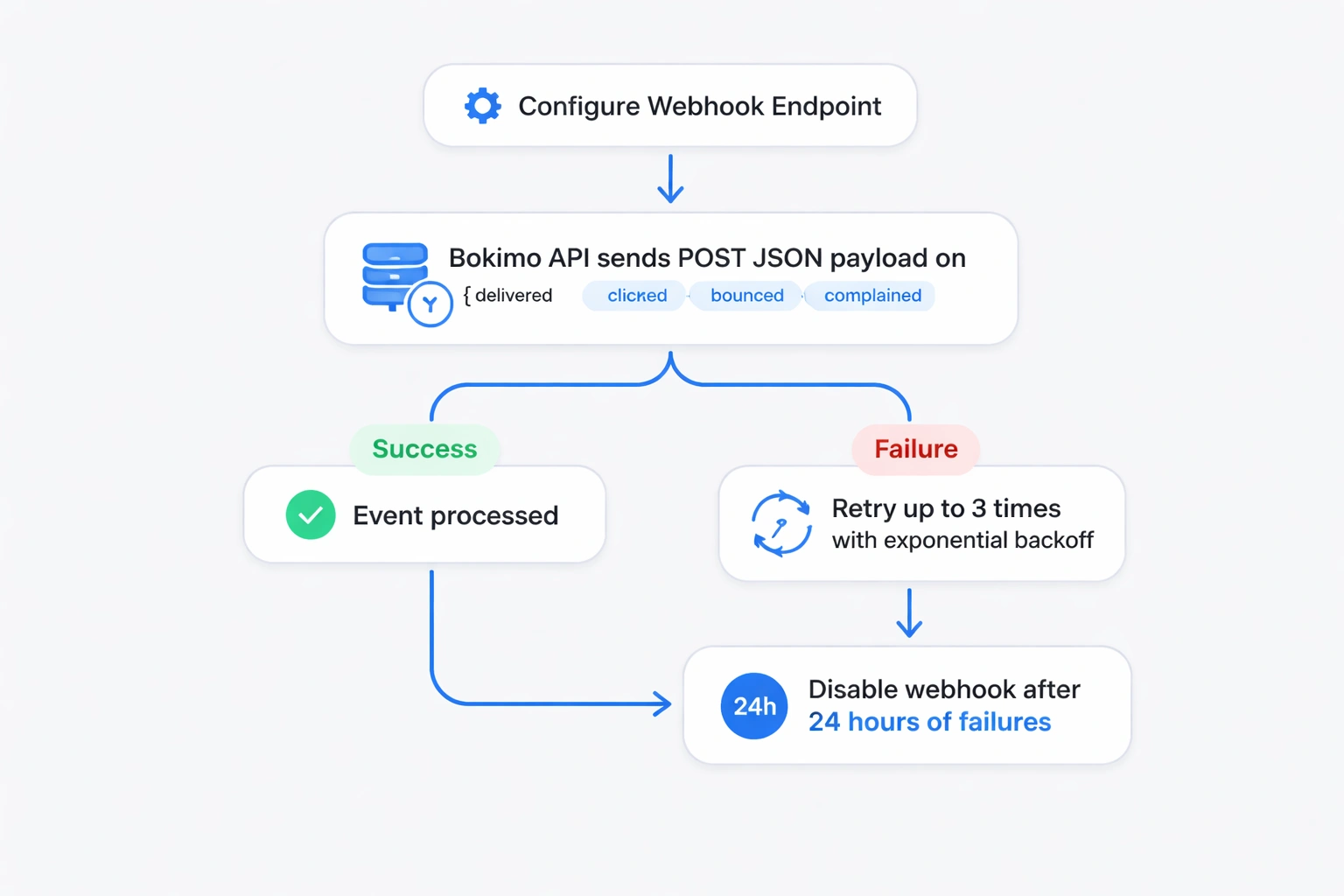
Webhooks POST JSON payloads to your server when events occur delivered, opened, clicked, bounced, complained. Configure endpoints in Settings > Webhooks. Bokimo retries failed deliveries three times with exponential backoff, then disables the webhook after 24 hours of failures.
Example payload for an open event:
{
  "event": "email.opened",
  "timestamp": "2026-05-27T14:32:18Z",
  "message_id": "msg_7d8e9f0a1b2c3d4e",
  "recipient": "[email protected]",
  "user_agent": "Mozilla/5.0 (iPhone; CPU iPhone OS 15_4...)",
  "ip_address": "203.0.113.42",
  "location": {
    "city": "Mumbai",
    "country": "IN"
  },
  "metadata": {
    "orderId": "12345"
  }
}
Verify signatures to prevent spoofing:
const crypto = require('crypto');

function verifyWebhook(payload, signature, secret) {
  const hmac = crypto.createHmac('sha256', secret);
  hmac.update(JSON.stringify(payload));
  const computed = hmac.digest('hex');
  return crypto.timingSafeEqual(
    Buffer.from(signature),
    Buffer.from(computed)
  );
}

app.post('/webhooks/bokimo', (req, res) => {
  const signature = req.headers['x-bokimo-signature'];
  const isValid = verifyWebhook(req.body, signature, process.env.WEBHOOK_SECRET);

  if (!isValid) {
    return res.status(401).send('Invalid signature');
  }

  const { event, message_id, metadata } = req.body;
  console.log(`${event} for message ${message_id}`);

  res.status(200).send('OK');
});
Respond with status 200 within 5 seconds. Bokimo marks slower responses as timeouts. Queue event processing in background jobs Redis, Celery, Sidekiq instead of blocking the webhook response.
Common event types include email.sent, email.delivered, email.bounced, email.opened, email.clicked, and email.complained. Use email.bounced events to clean lists. Hard bounces mean invalid addresses; suppress them immediately. Soft bounces (full inbox, temporary issues) need retry logic. Track clicks to score engagement. Explore email deliverability best practices to maintain sender reputation.
SDK Installation and Configuration
Install the official SDKs through standard package managers. Each includes TypeScript definitions, inline documentation, and examples.
Node.js:
npm install @bokimo/node
Initialize with environment variables:
require('dotenv').config();
const Bokimo = require('@bokimo/node');

const client = new Bokimo(process.env.BOKIMO_API_KEY, {
  timeout: 10000,
  retries: 3
});
Python:
pip install bokimo
Configuration:
import os
from bokimo import Client

client = Client(
  api_key=os.getenv('BOKIMO_API_KEY'),
  timeout=10,
  max_retries=3,
  base_url='https://api.bokimo.ai/v1'
)
PHP via Composer:
composer require bokimo/php-sdk
Laravel service provider:
// config/services.php
'bokimo' => [
  'key' => env('BOKIMO_API_KEY'),
],

// Use in controllers
use Bokimo\BokimoClient;

$bokimo = new BokimoClient(config('services.bokimo.key'));
Ruby:
gem install bokimo
Rails initializer:
# config/initializers/bokimo.rb
Bokimo.configure do |config|
  config.api_key = ENV['BOKIMO_API_KEY']
  config.timeout = 10
end
All SDKs support connection pooling, automatic retries with jitter, and request signing. Set timeout between 5 and 30 seconds. Increase max_retries for unstable connections. Check integration documentation for platform-specific guides.
Handling Attachments and Dynamic Content
Pass attachments as base64-encoded strings in the attachments array. It supports PDF, DOCX, XLSX, and image formats up to 10 MB per file. Encode files before sending and ensure MIME types are accurate. Bokimo scans attachments for malware.
Node.js example:
const fs = require('fs');

const pdfBuffer = fs.readFileSync('./invoice-12345.pdf');
const base64 = pdfBuffer.toString('base64');

await client.send({
  from: '[email protected]',
  to: '[email protected]',
  subject: 'Your Invoice',
  html: '<p>Invoice attached.</p>',
  attachments: [
    {
      filename: 'invoice-12345.pdf',
      content: base64,
      content_type: 'application/pdf'
    }
  ]
});
Dynamic content uses Liquid templating. Insert variables, conditionals, and loops:
<p>Hi {{ customer.first_name }},</p>

{% if order.total > 100 %}
<p>Thanks for your large order! Here's a 10% coupon: THANKYOU10</p>
{% endif %}

<ul>
{% for item in order.items %}
  <li>{{ item.name }} - ${{ item.price }}</li>
{% endfor %}
</ul>
Pass data in the context object:
await client.send({
  to: '[email protected]',
  template_id: 'tpl_8e9f0a1b',
  context: {
    customer: { first_name: 'Alex' },
    order: {
      total: 150,
      items: [
        { name: 'Widget', price: 75 },
        { name: 'Gadget', price: 75 }
      ]
    }
  }
});
Templates live in the dashboard under Templates > Manage. You can create them with a drag-and-drop builder powered by Claude Opus AI. Reference templates by ID in API calls. Version templates to test variations.
Testing in Sandbox Mode
Sandbox keys (prefixed with bk_test_) simulate delivery without hitting real inboxes. API calls succeed, webhooks fire, but messages queue in a virtual environment. Review test sends in the dashboard under Testing > Sandbox.
Switch to sandbox:
const client = new Bokimo('bk_test_YOUR_SANDBOX_KEY');

await client.send({
  to: '[email protected]', // Any address works
  subject: 'Test Message',
  html: '<p>This won\'t actually send.</p>'
});
Sandbox mode tracks rate limits, validates payloads, and returns realistic response times. Trigger specific webhook events using test flags:
curl -X POST https://api.bokimo.ai/v1/test/webhooks/trigger \
  -H "Authorization: Bearer bk_test_YOUR_KEY" \
  -d '{
    "event": "email.clicked",
    "message_id": "msg_test_123"
  }'
Your webhook endpoint receives the crafted payload immediately. Test error scenarios without harming sender reputation. Sandbox environments reset every 30 days.
Move to production by swapping keys:
const apiKey = process.env.NODE_ENV === 'production'
  ? process.env.BOKIMO_LIVE_KEY
  : process.env.BOKIMO_TEST_KEY;

const client = new Bokimo(apiKey);
Monitor production sends in the dashboard Analytics tab. Set alerts for bounce rates or spam complaints. Review bulk email service features to scale.
Optimizing Performance and Rate Limits
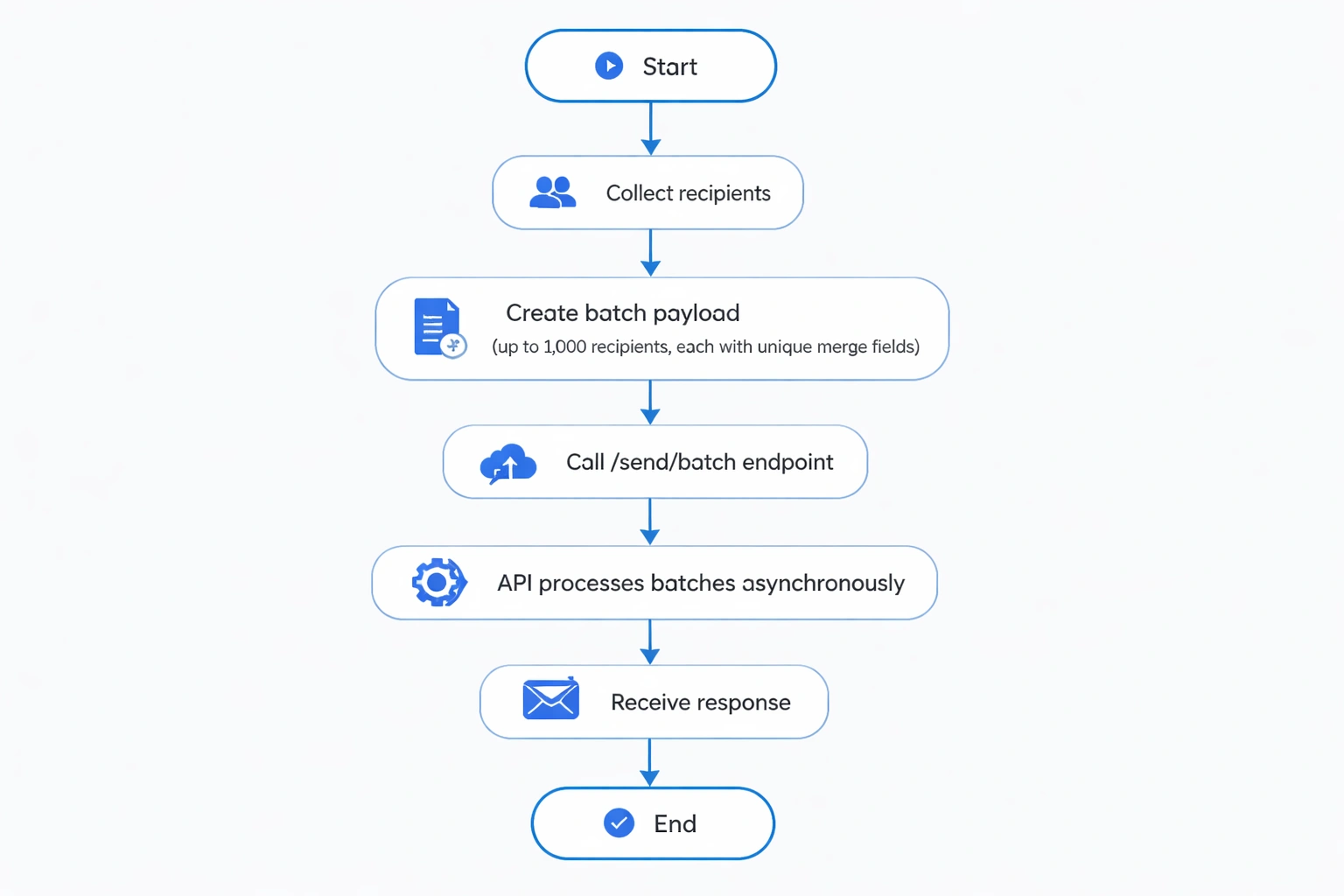
Batch requests when sending to multiple recipients. The /send/batch endpoint accepts up to 1,000 recipients per request, cutting latency and API quota usage. Each recipient can have unique merge fields.
Batch example:
const recipients = users.map(user => ({
  email: user.email,
  merge_fields: {
    first_name: user.firstName,
    account_type: user.plan
  }
}));

await client.send.batch({
  from: '[email protected]',
  subject: 'New Feature Alert',
  html: '<p>Hi {{ first_name }}, check out our latest feature!</p>',
  recipients: recipients
});
Bokimo processes batches asynchronously. The API returns a batch_id immediately. Poll /batches/{batch_id} for status or wait for a batch.completed webhook.
Rate limits apply per API key. Standard plans allow 1,000 requests per minute. Enterprise plans scale to 10,000 RPM with burst capacity to 15,000. Exceed limits and you get HTTP 429 responses with Retry-After headers.
Implement exponential backoff:
async function sendWithRetry(payload, maxRetries = 3) {
  for (let attempt = 0; attempt < maxRetries; attempt++) {
    try {
      return await client.send(payload);
    } catch (error) {
      if (error.status === 429) {
        const delay = Math.pow(2, attempt) * 1000;
        await new Promise(resolve => setTimeout(resolve, delay));
      } else {
        throw error;
      }
    }
  }
  throw new Error('Max retries exceeded');
}
Cache template content locally to avoid repeated lookups. Compress webhook payloads Bokimo supports gzip. Use connection pooling to reuse TCP sockets.
Monitor quota via /account/usage:
curl https://api.bokimo.ai/v1/account/usage \
  -H "Authorization: Bearer YOUR_API_KEY"
Response includes current period sends, remaining quota, and reset timestamp. Set alerts at 80%. Upgrade plans in the pricing dashboard to increase limits.
Error Handling and Debugging
Bokimo returns standard HTTP status codes: 2xx for success, 4xx for client errors, 5xx for server issues. Each error includes a machine-readable code and a message. Log both.
Common error codes:
| Code | HTTP Status | Meaning |
|---|---|---|
invalid_request |
400 | Malformed JSON or missing fields |
authentication_failed |
401 | Invalid or expired key |
rate_limit_exceeded |
429 | Too many requests |
recipient_invalid |
400 | Invalid email format |
template_not_found |
404 | Template ID missing |
insufficient_credits |
402 | Billing issue |
Parse errors:
try:
  response = client.send(...)
except BokimoAPIError as e:
  print(f"Error: {e.code} - {e.message}")
  if e.code == 'rate_limit_exceeded':
    time.sleep(60)
  elif e.code == 'recipient_invalid':
    log_invalid_email(recipient)
Enable debug mode:
const client = new Bokimo(API_KEY, { debug: true });
Debug mode prints request/response bodies, headers, and timing. Disable in production.
Use the API playground at https://bokimo.ai/email/auth/sign-in under Developer Tools to test endpoints. Check system status at https://status.bokimo.ai. Bokimo maintains a 99.9% uptime SLA for paid plans. Learn more about email marketing strategies for edge cases.
Security Best Practices
Store API keys in environment variables or secret managers like AWS Secrets Manager, HashiCorp Vault, or Doppler. Never commit keys to Git. Scan codebases with TruffleHog or GitGuardian.
Rotate keys quarterly:
# Generate new key in dashboard
export BOKIMO_API_KEY=bk_live_NEW_KEY
# Deploy config
# Delete old key after 24 hours
Restrict key permissions to minimum scopes. Revoke unused keys.
Encrypt webhook payloads if transmitting over untrusted networks:
const { publicEncrypt } = require('crypto');

const encrypted = publicEncrypt(
  YOUR_PUBLIC_KEY,
  Buffer.from(JSON.stringify(webhookPayload))
);
Implement IP allowlists for webhook endpoints. Bokimo sends from static IP ranges at https://api.bokimo.ai/ips.
Sanitize user content:
const escapeHtml = (str) => {
return str
.replace(/&/g, '&')
.replace(/</g, '<')
.replace(/>/g, '>')
.replace(/"/g, '"')
.replace(/'/g, ''');
};
await client.send({
html: `<p>${escapeHtml(userInput)}</p>`
});
Enable two-factor authentication. Use strong passwords. Review access logs under Security > Activity.
Going Live with Production Traffic
Test thoroughly in sandbox before switching to live keys. Validate rendering across clients Gmail, Outlook, Apple Mail. Use Litmus or Email on Acid for previews.
Warm up your domain gradually:
- Week 1: 100 emails/day to engaged users
- Week 2: 500 emails/day
- Week 3: 2,000 emails/day
- Week 4: Full volume
Sudden spikes trigger spam filters. Bokimo's team monitors new accounts and pauses sends if metrics drop. Contact support for high-volume launches.
Configure SPF, DKIM, and DMARC:
v=spf1 include:spf.bokimo.ai ~all
Values are at https://bokimo.ai/products/features. Verify with MXToolbox or Google's CheckMX.
Set up monitoring:
- Bounce rate: Under 2%
- Complaint rate: Under 0.1%
- Open rate: 15-25% typical
- Delivery time: Under 5 seconds median
Alert on anomalies using Datadog or PagerDuty. Query /analytics:
curl https://api.bokimo.ai/v1/analytics/summary?period=24h \
  -H "Authorization: Bearer YOUR_API_KEY"
Review email advertising strategies to maximize engagement. A/B test subject lines and send times.
Use Cases
E-commerce stores use Bokimo for order confirmations, shipping updates, and abandoned carts. Shopify and WooCommerce plugins simplify setup.
- Customer checks out
- Payment webhook triggers backend
- Backend calls
/sendwith order details - Customer gets confirmation
- Tracking updates auto-send
Explore e-commerce solutions.
SaaS platforms use it for onboarding, announcements, and alerts. Integrate with auth systems:
app.post('/auth/signup', async (req, res) => {
  const user = await createUser(req.body);

  await bokimo.send({
    to: user.email,
    template_id: 'welcome_email',
    context: { first_name: user.firstName }
  });

  res.json({ success: true });
});
Learn about SaaS strategies.
Agencies use sub-accounts for clients. Whitelabel emails. See agency solutions.
Startups use the free tier (1,000 sends/month) to validate. See startup features.
Enterprises use webhook chains and role-based access. See enterprise deployments.
Advanced Patterns
Queue emails during high traffic. Use RabbitMQ or AWS SQS:
// Producer
await queue.publish('emails', {
  to: '[email protected]',
  template: 'welcome',
  data: { firstName: 'Taylor' }
});

// Consumer
queue.subscribe('emails', async (message) => {
  await bokimo.send({
    to: message.to,
    template_id: message.template,
    context: message.data
  });
});
Implement idempotency. Pass unique keys:
await bokimo.send({
  idempotency_key: `order-${orderId}`,
  to: '[email protected]',
  subject: `Order ${orderId} confirmed`
});
Segment dynamically.
const segmentedCampaign = await bokimo.campaigns.send('cmp_abc123', {
  recipients: users.map(u => ({
    email: u.email,
    metadata: { segment: u.purchaseHistory > 1000 ? 'vip' : 'standard' }
  }))
});
Integrate with analytics. Append UTM parameters:
const trackingLink = `https://yourstore.com/products?utm_source=bokimo&utm_medium=email&utm_campaign=${campaignId}`;
Combine with other Bokimo products like Smler's QR tools for multi-channel campaigns.
Integrating Bokimo AI turns email into an automated growth engine. The API handles deliverability, scaling, and compliance. Start with sandbox testing, warm up production, and scale with batching. The complete documentation and SDKs remove technical barriers.
Published with LeafPad