

Transactional emails are the quiet workhorses of digital infrastructure. Password resets. Order confirmations. Shipping updates. They're not trying to sell anything they just need to work.
That's what makes them interesting. Users actually want these emails. Open rates run 70-90% because people check for them specifically. Compare that to your average marketing campaign and you see why these messages matter. When we built automated workflows for internal compliance at Bokimo, we discovered transactional emails needed completely separate infrastructure from bulk campaigns.
The legal lines are surprisingly clear. CAN-SPAM and similar regulations exempt transactional emails from unsubscribe requirements when the primary purpose is completing a transaction. But add promotional content and you shift to "commercial" classification, triggering all the compliance obligations. GDPR Article 6(1)(b) lets you process data necessary to fulfill a contract broader latitude than marketing messages require.
The technical requirements diverge from bulk campaigns. Transactional systems prioritize speed and reliability over volume. Users expect password resets within 30 seconds. Order confirmations should arrive before they close the browser. This means dedicated IP addresses with good reputations, redundant sending paths, and real-time monitoring that catches failures fast. The email deliverability best practices governing marketing emails apply doubly here a bounced order confirmation loses immediate revenue.
Recipients actively anticipate transactional emails, checking inboxes right after triggering actions. This creates a trust moment. A delayed shipping notification makes people anxious. A confusing password reset generates support tickets. A well-crafted receipt with tracking links and next-step guidance reinforces purchase decisions and reduces buyer's remorse.
Authentication and Deliverability
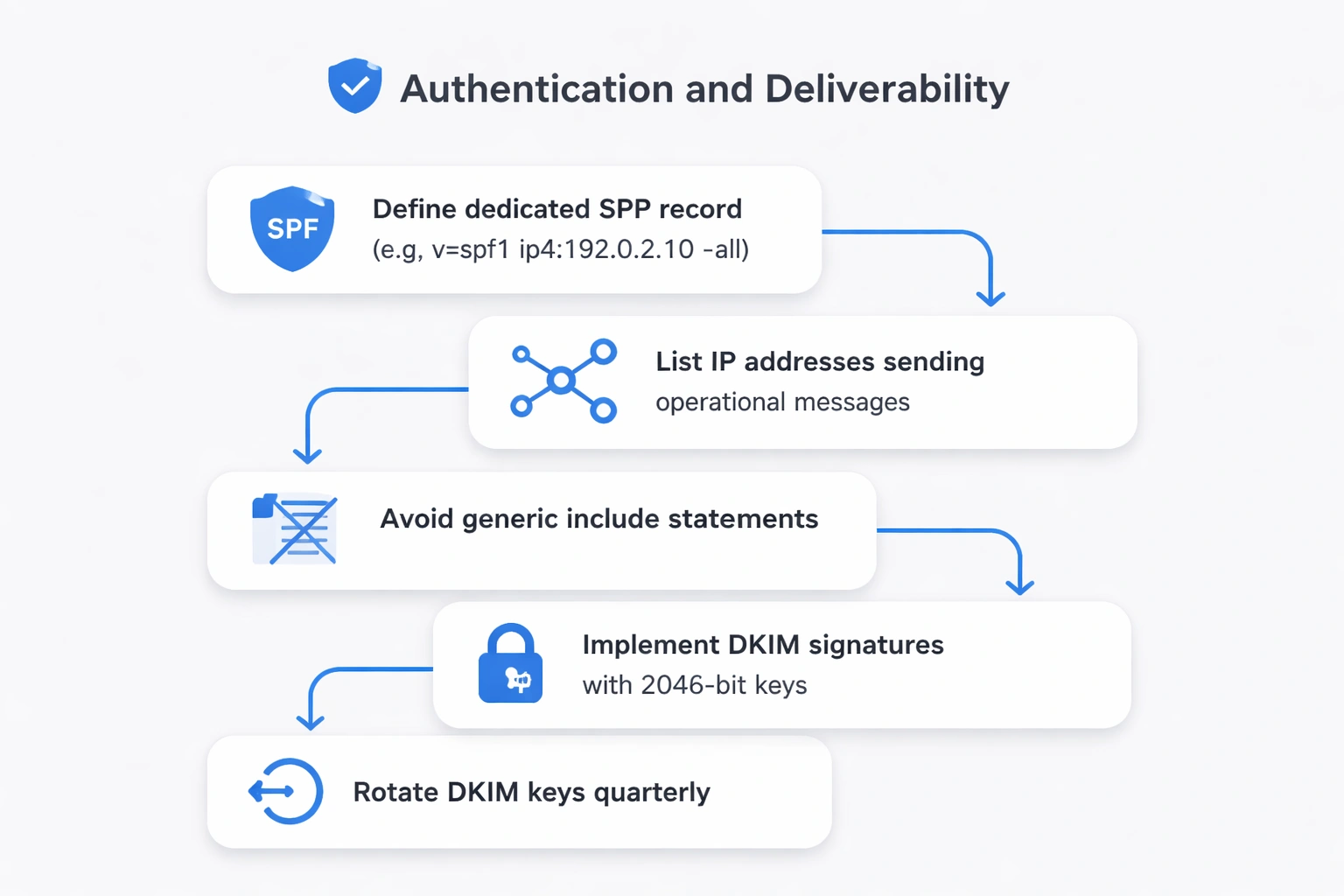
SPF records for transactional email need tighter specifications than marketing infrastructure. List only the IP addresses actively sending operational messages. Generic "include" statements granting broad permissions introduce vulnerability if a vendor's other customers spam, your transactional reputation suffers. Create dedicated SPF records like v=spf1 ip4:192.0.2.10 -all that hard-fail unauthorized sources.
DKIM signatures should use 2048-bit keys rotated quarterly for transactional systems. The cryptographic signature proving the message originated from your domain wasn't altered in transit. Configure separate DKIM selectors for transactional mail (e.g., transactional._domainkey) to isolate reputation and simplify troubleshooting. Gmail seeing consistent DKIM validation from your transactional subdomain over months pushes inbox placement rates toward 99.7%.
DMARC policies should reach p=reject for domains sending transactional email. This instructs receivers to block any message failing authentication checks, preventing phishing attacks impersonating your order confirmations or password resets. Start with p=none for monitoring, move to p=quarantine after validating legitimate traffic, then enforce p=reject once daily reports show zero false positives. Include rua and ruf tags for aggregate and forensic reporting.
Dedicated IP addresses for transactional email prevent marketing campaigns from damaging critical infrastructure. Even legitimate bulk campaigns experience temporary reputation dips from spam complaints or engagement drops. Isolating transactional mail on separate IPs with carefully warmed reputations ensures password resets reach inboxes regardless of last week's promotional send. Organizations sending under 50,000 transactional emails monthly can use shared IP pools from specialized providers offering pre-warmed infrastructure.
Return-Path domains must match the visible From domain to satisfy DMARC alignment requirements. If your order confirmations display "From: [email protected]," the envelope sender should use "[email protected]" or another subdomain of example.com. Mismatched return paths trigger authentication failures even with valid SPF records. The email automation guide explains alignment configurations for complex sending scenarios.
Critical Transactional Email Types
Order confirmations must arrive within 60 seconds of purchase completion, containing order numbers, itemized products with images, payment amounts, billing addresses, and expected delivery dates. Include one-click access to order status pages rather than forcing customers to log in. Embed clear customer service contact methods 45% of post-purchase anxiety comes from uncertainty about how to get help. The psychological function goes beyond information: immediate confirmation validates the purchase decision during the window when buyer's remorse peaks.
Shipping and delivery notifications turn logistics into engagement opportunities. Send triggered updates when orders ship, include carrier tracking links with embedded tracking numbers, and provide estimated delivery windows with calendar integration. Real-time "out for delivery" notifications on delivery day reduce missed deliveries by 23%. Post-delivery confirmations create feedback opportunities: "Your package arrived how was your experience?"
Password reset and authentication emails demand bulletproof deliverability since users actively wait for them with anxiety rising every delayed second. Use six-digit numeric codes or cryptographically secure tokens with 1-hour expiration. Display expiration times prominently. Include the IP address and approximate location of the reset request for security transparency. Never embed reset links as images text-based buttons ensure deliverability even when images block. The "not you?" call-to-action provides immediate fraud reporting.
Account creation and welcome workflows bridge acquisition to activation. The initial verification email confirms email ownership while setting brand tone. Include the verification action above the fold studies show 34% of users abandon signups when they can't immediately find the verification button. Follow successful verification with a second email introducing core features through benefit-focused microcopy and specific next actions. The startup solutions page details activation sequences for new user onboarding.
Receipt and invoice emails serve accounting and tax purposes, requiring specific data formatting. Include invoice numbers following consistent schemes, itemized charges with tax breakdowns, payment methods with last four digits, billing addresses, and purchase dates in machine-readable formats. Attach PDF invoices when B2B customers need them for expense systems. These functional emails still benefit from clean HTML rendering 40% of receipt emails are accessed on phones during expense reporting.
Subscription and renewal reminders for SaaS and membership businesses require careful timing and tone. Send first notices 14 days before renewal with clear pricing, renewal dates, and cancelation instructions. Follow with reminders at 7 days and 24 hours. Frame renewals as service continuity rather than payment extraction: "Your premium features renew tomorrow" rather than "Your card will be charged." Failed payment notifications need empathetic copy acknowledging possible card expiration rather than implying financial problems.
Design and Content
Subject lines for transactional emails should prioritize clarity over creativity, immediately communicating purpose and urgency. "Your ShopName order #12345 has shipped" beats clever wordplay because recipients scan for specific information. Include order numbers, tracking numbers, or account identifiers when relevant. Keep subject lines under 50 characters to prevent mobile truncation. Avoid ALL CAPS and excessive punctuation that trigger spam filters despite transactional classification.
Preheader text extends subject lines with actionable details rather than repeating brand names. While marketing emails optimize preheaders for intrigue, transactional preheaders should compress key information: "Arriving Tuesday, Mar 12 via FedEx" adds value beyond "Your order is on the way." Configure preheaders explicitly rather than allowing email clients to display random body text this requires hidden span elements at the message start.
Single-column layouts work best for transactional emails since most users access them on mobile devices within minutes of triggering. Keep message width to 600 pixels maximum. Place primary actions above the fold the critical button or information users need should appear within the first 300 pixels. Avoid complex multi-column layouts that break unpredictably across email clients. The email templates library includes mobile-optimized transactional designs.
Plain text alternatives remain essential despite HTML dominance. Configure proper multipart/alternative messages with thoughtfully formatted text versions, not auto-generated HTML strips. Some security-conscious users disable HTML rendering. Text versions also improve deliverability signals by proving you're not hiding content. Structure text emails with clear section breaks, ASCII-friendly formatting, and full URLs since hyperlinks won't render.
Branding consistency across transactional templates reinforces recognition without overwhelming functionality. Use header logos at 200x50 pixels maximum, apply brand colors to buttons and accents rather than backgrounds, and maintain typography hierarchy matching your product interface. Transactional emails are micro-interactions with your product visual coherence reduces cognitive load. Avoid making receipts "exciting" through heavy design that obscures information.
Accessibility requirements for transactional emails include semantic HTML markup, sufficient color contrast (4.5:1 minimum for body text), alt text for all images including logos, and keyboard-navigable buttons. Use role="button" and proper aria-label attributes for call-to-action links styled as buttons. Test templates with screen readers critical information buried in image alt text creates barriers. The 15% of users with visual impairments disproportionately rely on transactional emails for purchase verification.
Timing and Trigger Configuration
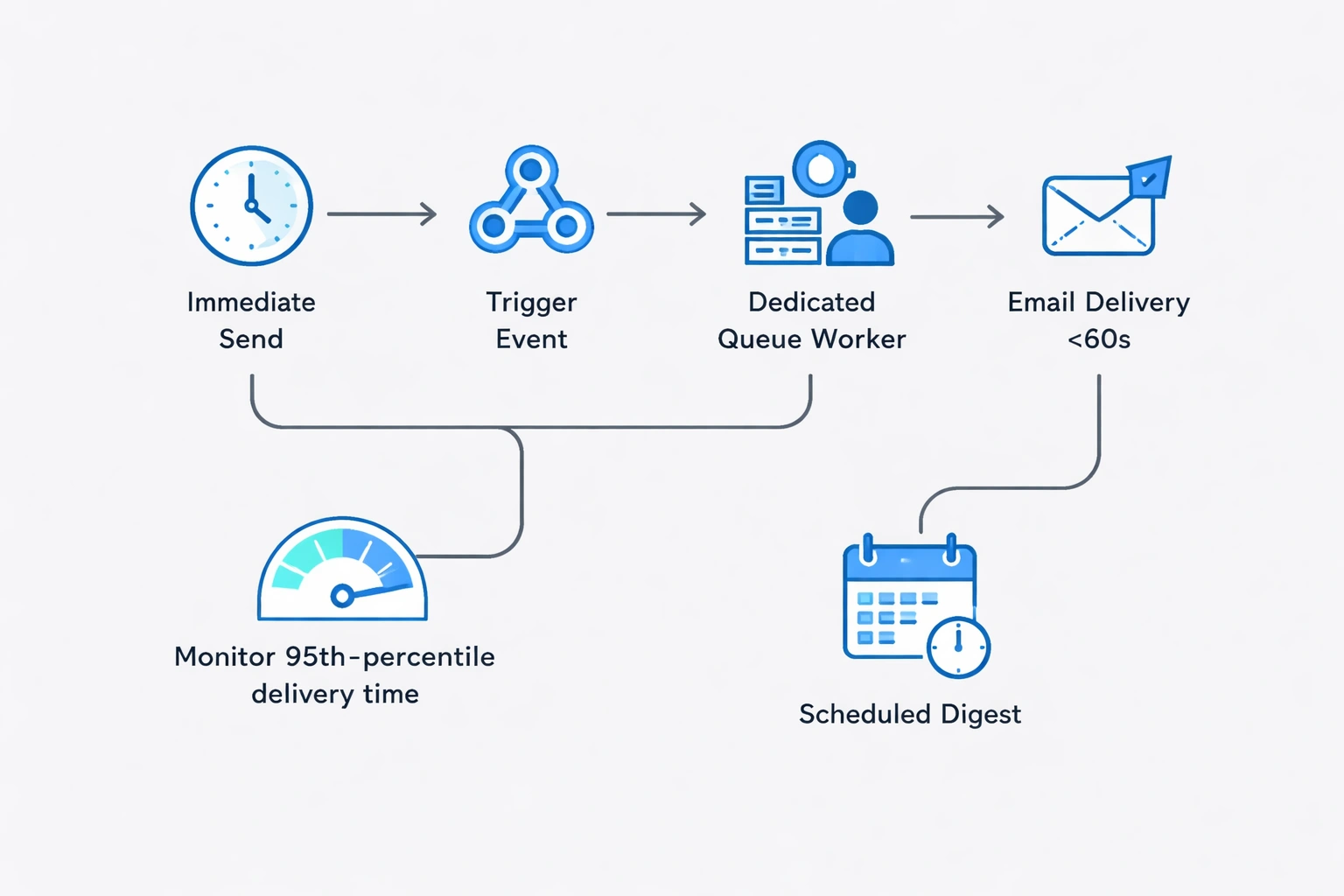
Immediate sends for time-sensitive transactional emails means sub-60-second delivery from trigger event to inbox. Configure webhooks that fire email jobs the instant database transactions commit. Use dedicated queue workers that bypass bulk sending schedules. Monitor 95th-percentile delivery times if 5% of password resets take over two minutes, users assume the system failed and click reset again, creating support load. The email automation workflows guide covers technical queueing architectures.
Scheduled sends apply to digest-style transactional emails consolidating multiple events. A daily summary of account activity works better than 47 individual notifications. Weekly invoice emails for variable usage billing prevent inbox fatigue. Configure send windows respecting user time zones a 9 AM local delivery ensures business users see invoices when processing expenses. Store trigger events in a buffer table, then batch process at optimal times.
Retry logic for failed transactional sends requires aggressive but intelligent persistence. Attempt immediate retry after 30 seconds for soft bounces. Escalate to a secondary sending path after two failures. Continue retry attempts every 5 minutes for the first hour, then exponentially back off. Hard bounces should trigger immediate address validation workflows. Never retry after 24 hours the operational moment has passed, and late delivery creates confusion.
Suppression list management for transactional email differs from marketing. Hard bounces require immediate suppression across all email types. Spam complaints warrant review but not automatic suppression for purely transactional addresses users sometimes mark promotional content as spam then wonder why order confirmations stopped. Maintain separate suppression lists for transactional and marketing infrastructure, with human review for transactional additions.
Personalization and Dynamic Content
Transaction-specific data forms the foundation of transactional personalization order numbers, tracking links, account balances, timestamps. Use template variables pulling directly from triggering database events: {{order.number}}, {{shipment.carrier}}, {{payment.amount}}. Validate variable population in staging environments since missing data creates broken experiences. Include fallback values for optional fields to prevent rendering errors.
Behavioral context from user history enhances transactional value without crossing into promotional territory. An order confirmation can reference previous purchases: "Welcome back this is your 4th order this year!" A shipping notification might note, "Your usual delivery address" versus "New address for this order." These contextual touches prove you recognize customers while serving operational purposes. Pull context from user profiles and session data.
Product recommendations in transactional emails require careful classification boundaries. A receipt can include "You might also like" suggestions based on purchase category, but extensive promotional content shifts the message to commercial classification. The primary purpose test asks whether removing recommendations would eliminate the email's core function. Keep recommendations to 2-3 items maximum, clearly visually separated from transactional content.
Account milestones embedded in operational emails feel earned rather than marketing. A subscription renewal notice can acknowledge "3 years as a member" alongside renewal details. An order confirmation might celebrate "Your 10th purchase thank you!" These acknowledgments carry weight because they're triggered by actual behavior rather than segmented campaigns. The SaaS solutions page details milestone strategies for subscription businesses.
Compliance and Legal Requirements
CAN-SPAM exemptions for transactional email apply only when commercial content remains incidental. The FTC's primary purpose test evaluates whether the subject line, email content, and call-to-action focus on completing a transaction or delivering account information. Adding a promotional section shifts classification to commercial, requiring physical addresses, unsubscribe mechanisms, and 10-day opt-out processing. Keep transactional emails purely functional to maintain exemption benefits.
GDPR Article 6(1)(b) provides lawful basis for transactional processing without requiring consent since emails are necessary for contract performance. Sending an order confirmation or password reset falls under this provision. However, including marketing content requires separate Article 6(1)(a) consent. Document your legal basis in privacy policies, clearly explaining which email types users will receive regardless of marketing preferences.
Physical address requirements become mandatory when transactional emails include promotional content. CAN-SPAM requires valid postal addresses for all commercial messages. Use your principal place of business or registered agent address. Post office boxes satisfy requirements. The address must be current maintaining outdated addresses risks penalties. Include addresses in email footers using standard formatting that spam filters recognize as compliance elements.
Unsubscribe mechanisms aren't legally required for purely transactional emails, but provide preference centers allowing users to choose delivery methods (email versus SMS versus in-app) or frequency for non-critical notifications. Never allow unsubscribing from essential operational emails like password resets or purchase confirmations clearly communicate which messages are mandatory for service delivery. The enterprise solutions page covers preference architecture for complex organizations.
Testing and Quality Assurance
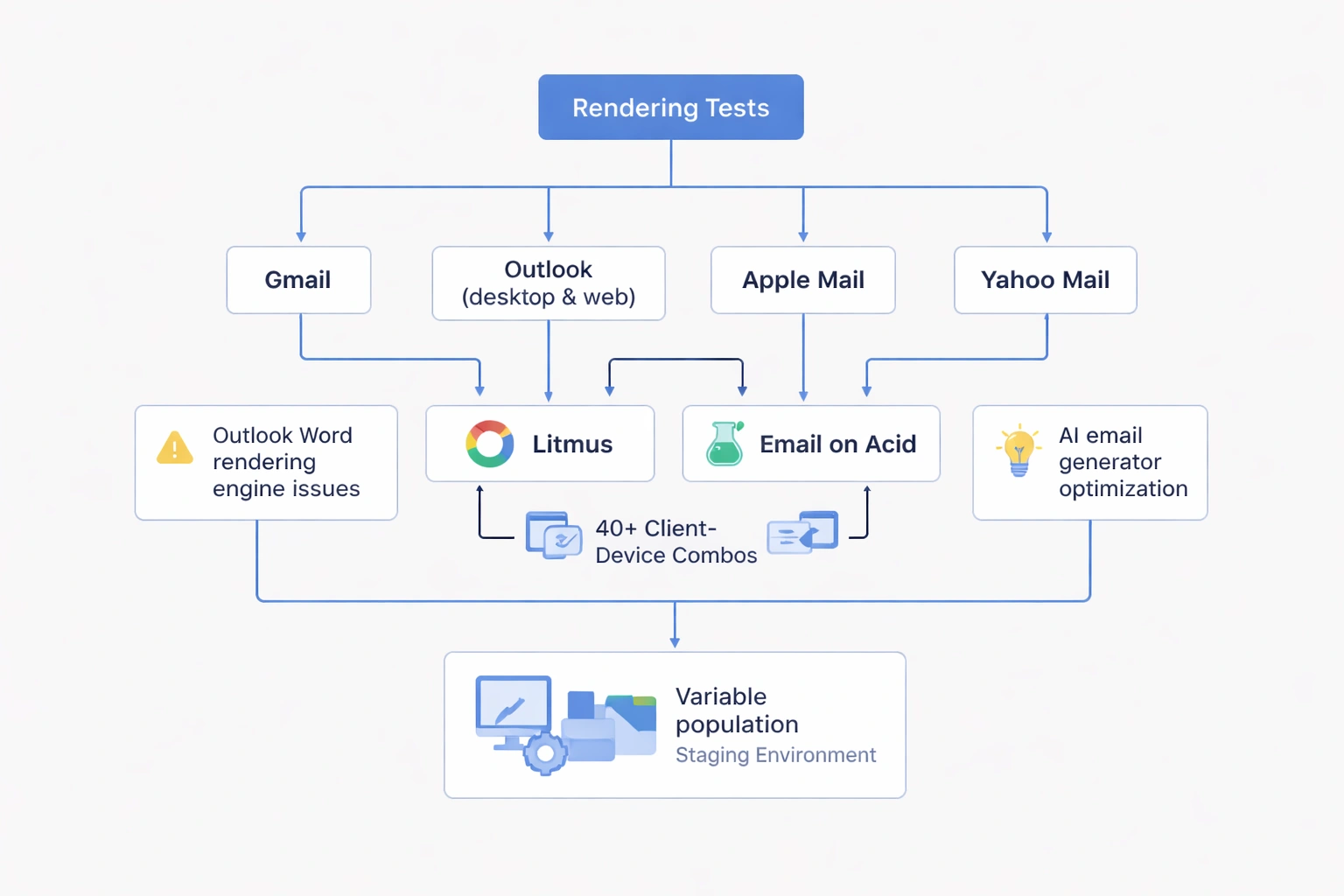
Rendering tests across email clients matter more for transactional emails since users access them immediately on whichever device is handy. Test templates in Gmail, Outlook (desktop and web), Apple Mail, and Yahoo Mail minimum. Use services like Litmus or Email on Acid for automated screenshot testing across 40+ client-device combinations. Pay attention to Outlook's Word rendering engine that breaks modern CSS. The AI email generator includes client-specific optimization.
Variable population testing requires staging environments replicating production data structures. Create test cases covering edge scenarios: extremely long product names, international addresses with non-ASCII characters, order totals with multiple currencies, missing optional fields. Build template validation that checks for undefined variables before sending. A password reset email with a broken link destroys user trust instantly test every possible data state.
Deliverability monitoring for transactional infrastructure demands real-time alerting. Configure alerts when 95th-percentile delivery times exceed 60 seconds, when bounce rates exceed 1%, or when spam complaint rates surpass 0.01%. Use seed lists sending test messages to major providers every 15 minutes, measuring inbox placement rates. The cheapest email API comparison includes deliverability monitoring capabilities.
Load testing ensures transactional infrastructure handles traffic spikes. An e-commerce flash sale generating 1,000 orders in 10 minutes must trigger 1,000 immediate confirmations. Use tools like Apache JMeter to simulate concurrent email jobs. Identify queueing bottlenecks and processing latency under load. Configure auto-scaling that adds workers when queue depth exceeds thresholds. Failed transactional delivery during peak moments creates support avalanches.
Advanced Optimization Strategies
AMP for Email transforms static transactional messages into interactive experiences directly in Gmail and other supporting clients. Users can track packages, complete satisfaction surveys, or reschedule deliveries without leaving their inbox. Implement AMP components for high-value transactional emails where interaction drives operational efficiency. Include fallback HTML for clients not supporting AMP. The specification requires separate MIME parts and strict validation.
Tracking pixels and analytics for transactional emails should focus on operational metrics rather than marketing conversion. Monitor open rates to detect deliverability problems sudden drops indicate reputation issues. Track link clicks on critical CTAs like "Track Package" or "Complete Setup" to identify UX friction. Avoid excessive tracking that loads slowly or triggers privacy concerns. Respect user expectations that operational emails serve functional purposes.
Localization and internationalization requirements extend beyond translation to cultural formatting preferences. Date formats vary globally Americans expect MM/DD/YYYY while Europeans use DD/MM/YYYY. Currency symbols require proper placement and decimal separators. Address formats follow country-specific conventions. Use internationalization libraries that handle these nuances automatically based on user locale. The e-commerce solutions page details multi-currency transactional flows.
Event-driven architectures decouple transactional email logic from application code. Applications publish events to message queues when significant actions occur. Email services subscribe to relevant events and generate appropriate messages. This separation improves reliability if the email service goes down, events queue for later processing rather than blocking application flows. Use tools like RabbitMQ, Apache Kafka, or cloud-native event buses for production systems.
Performance Metrics and Monitoring
Delivery rate benchmarks for transactional email should exceed 99% for properly authenticated infrastructure. Track delivery rates by email type password resets should approach 99.9% while less critical notifications might accept 98%. Monitor by domain Gmail, Outlook, and Yahoo each have different filtering behaviors. Set alerts when delivery rates for any major provider drop below thresholds indicating reputation problems.
Time-to-inbox measurements matter more for transactional emails than marketing campaigns. Track 50th, 95th, and 99th percentile delivery times from trigger event to recipient inbox. Use seed addresses with timestamp tracking to measure actual delivery latency. Investigate when 95th percentile times exceed 90 seconds users expecting immediate emails lose confidence after two minutes. The email marketing guide covers general deliverability metrics.
Engagement rates for transactional emails differ fundamentally from marketing metrics. Open rates average 70-90% since users actively anticipate messages. Click-through rates depend on email type order confirmations with tracking links see 40-60% clicks while password resets show 90%+ click rates within minutes. Low engagement on transactional emails indicates deliverability problems, poor mobile rendering, or confusing content rather than audience disinterest.
Error rates and bounce tracking requires granular categorization. Hard bounces indicate invalid addresses requiring immediate suppression. Soft bounces from full mailboxes should retry with exponential backoff. Authentication failures suggest DNS configuration problems needing immediate attention. Track error patterns by email type and recipient domain to identify systemic issues versus individual problems.
Integration with Marketing Strategy
Transactional touchpoints create permission moments for marketing opt-ins without violating transactional classification. A post-purchase confirmation can include a clearly optional checkbox: "Yes, send me weekly style tips and exclusive offers." The opt-in must be genuinely optional, unchecked by default, and clearly separated from transactional content. Successfully converting 2-3% of transactional recipients to marketing subscribers yields high-value audience growth.
Brand consistency between transactional and marketing emails reinforces recognition and trust. Use identical header designs, typography systems, and voice guidelines across all email types. Recipients should instantly recognize transactional emails as coming from your brand. However, avoid making operational emails feel like marketing the distinctive footer or header signals functional purpose. The agency solutions page covers multi-brand transactional strategies.
Cross-channel coordination ensures transactional emails complement other touchpoints rather than creating noise. When shipping confirmations go out via email, suppress redundant SMS notifications unless users explicitly prefer multi-channel. Sync transactional email timing with mobile push notifications stagger delivery by 5-10 minutes to create reinforcement rather than annoyance. Build preference centers allowing granular channel control.
Customer lifecycle integration positions transactional emails as data sources for segmentation and personalization. Track which transactional emails users engage with to understand preferences and priorities. Users who obsessively click tracking links value transparency and control. Those who ignore shipping notifications but engage with receipt emails care about finances. Feed transactional engagement data back into marketing automation platforms for sophisticated behavioral targeting.
Infrastructure and Tool Selection
Dedicated transactional email providers like SendGrid's Transactional Email API, Mailgun, or Postmark specialize in operational message delivery with infrastructure optimized for speed and reliability. These platforms maintain pre-warmed IP pools, provide real-time delivery APIs, and offer webhook-based event tracking. Pricing typically ranges from $0.75 to $3.00 per thousand emails depending on volume commitments and feature requirements.
Marketing platforms with transactional capabilities include Mailchimp's Mandrill, HubSpot's Transactional Email API, and Bokimo AI's integrated transactional features. These unified platforms simplify managing both email types from a single interface, sharing subscriber data and maintaining consistent branding. Consider unified platforms when transactional volume remains under 100,000 monthly messages and team size limits tool proliferation benefits.
Email API selection criteria should prioritize delivery speed, authentication support, webhook reliability, and template management capabilities. Evaluate APIs based on time-to-inbox SLAs, DKIM/SPF/DMARC configuration options, real-time event tracking, and template versioning systems. The bulk email service guide compares API features across major providers.
Infrastructure as code approaches treat transactional email templates and configurations as versioned assets in source control. Store template HTML in Git repositories with proper review workflows. Use environment-specific variables for API keys and sending domains. Implement CI/CD pipelines that validate template rendering before deploying to production. This engineering discipline prevents accidental breakage of critical operational communications.
Transactional emails work because users want them. That's rare. When someone clicks "forgot password," they're waiting for that email. When they buy something, they want confirmation. This creates attention and trust that marketing campaigns rarely achieve.
The teams doing this well in 2026 combine deliverability expertise, design craft, and behavioral psychology. They obsess over delivery latency, test across devices religiously, and write copy that reduces anxiety rather than creating noise. Whether confirming a $10 purchase or resetting access to critical business systems, every transactional email matters. The features that power effective transactional email separate functional tools from strategic infrastructure.
Published with LeafPad